Rate limit issues (GPT for Sheets)
Service invoked too many times
Problem: You are facing a rate limit error message from Google that indicates you've exceeded the daily limit for external service calls.
- Quota for gmail.com accounts: 20k / day
- Quota for Google Workspace accounts: 100k / day
Google's rate limits apply to all add-ons and scripts, not just ours. If you use multiple scripts or add-ons, your usage counts towards the same rate limits. It is not possible to increase them as explained here.
- Quotas reset every 24 hours, so wait for the end of this period to regain access.
- Use bulk tools to bypass this error, as they are not subject to Google's rate limits.
- You can use GPT for Excel instead, as this add-in is not affected by Google's rate limits.
Token limit is reached
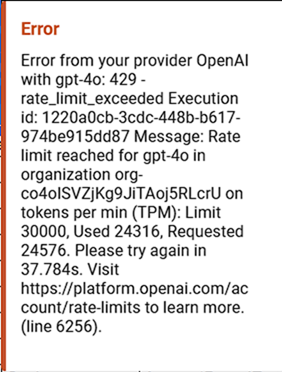
Problem: You are facing a rate limit error message from your AI provider that indicates you've reached your tokens per minute limit.
-
Temporary: Choose a different model, or wait until your token limit resets.
-
Permanent: Use built-in models, which do not require an API key.
Request limit is reached
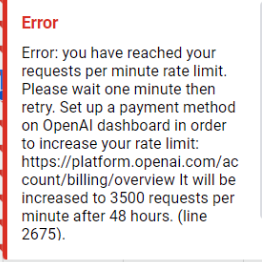
Problem: You are facing a rate limit error message from your AI provider that indicates you've reached your requests per minute limit.
-
Temporary: Choose a different model, or wait until your request limit resets: one minute or 24 hours.
-
Permanent: Use built-in models, which do not require an API key.