Manage API endpoints
As a space owner or admin, you can set up API endpoints for your space. Models available through the endpoints will be accessible to all users in the space
API endpoints are available only for GPT for Excel and Word spaces.
Connect to Azure OpenAI
GPT for Excel and GPT for Word can connect to Azure AI to use OpenAI models. In Azure AI, each model has a dedicated API endpoint that you use to access the model.
Prerequisites
You are the owner or an admin of the space.
Your space is on the Business or Enterprise plan or pay-as-you-go pricing.
You have an Azure account with Azure AI service access.
You have deployed a model in a project.
To connect to an Azure OpenAI API endpoint:
Get the Azure OpenAI API endpoint details
To connect to Azure AI from GPT for Excel and Word, you need the endpoint URL, API key, deployment name, and model name for the Azure OpenAI model you want to use.
-
Sign in to Microsoft Foundry.
-
Select the project that has the model you want to use.
-
Click View deployments.
-
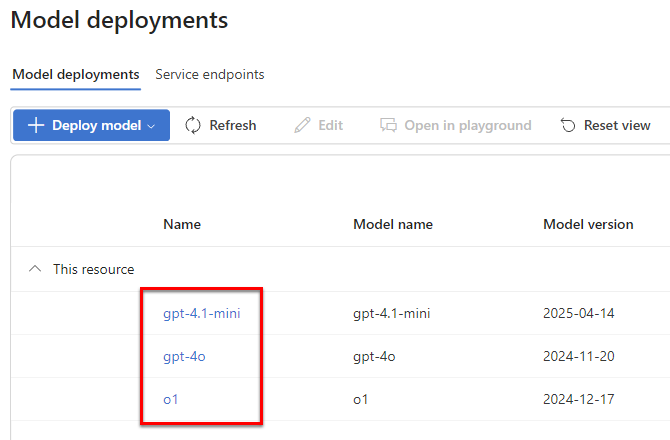
In Deployed models, in the models list, click the name of the model you want to use.
-
Select Details.
-
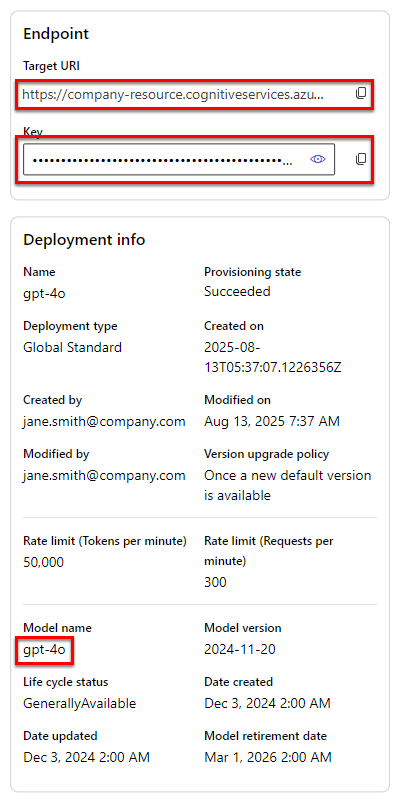
In the model details, copy the Target URI, Key, Deployment name, and Model name.
Set up the Azure OpenAI API endpoint
-
Sign in to the GPT for Work dashboard with your Microsoft or Google account.
-
In the sidebar, select Custom API endpoints.
-
Select the Bulk models tab.
-
Click Azure OpenAI endpoints (Chat Completions API).
tipIf you already have Azure OpenAI API endpoints set up, click Add an Azure OpenAI API endpoint.
-
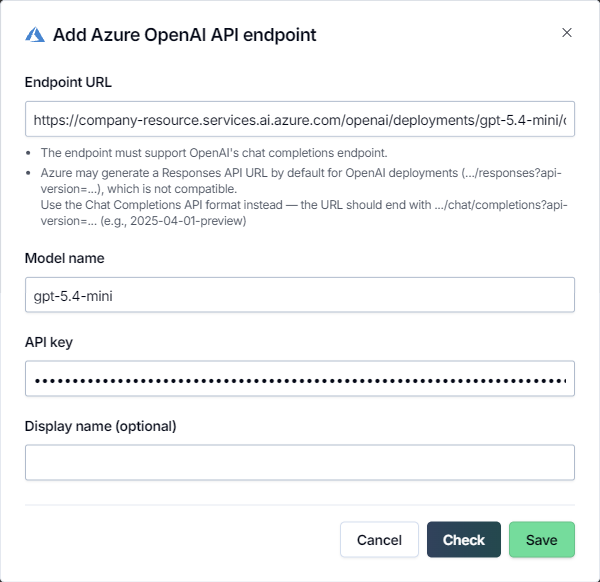
Define the endpoint settings:
-
Endpoint URL: Enter the endpoint URL for the model using the Azure OpenAI Chat Completions API endpoint format:
https://<resource-name>.<domain>/openai/deployments/<deployment-name>/chat/completions?api-version=<api-version>If the URL you copied does not use the above format, rewrite it. For example, let's assume that your deployment name is
gpt-5.4-mini, the API version is2025-04-01-preview, and you copied the following URL:https://company-resource.services.ai.azure.com/openai/v1/responsesTo rewrite the URL into the Chat Completions API format, replace everything after the domain with
/openai/deployments/<deployment-name>/chat/completions?api-version=<api-version>and replace the placeholders with your deployment name and the API version:https://company-resource.services.ai.azure.com/openai/deployments/gpt-5.4-mini/chat/completions?api-version=2025-04-01-previewinfoThe
api-versionis the Azure OpenAI REST API version, which is not shown on the Microsoft Foundry model details page. As a rule, use2025-04-01-previewas the value. -
Model name: Enter the model name.
-
API key: Enter the API key for accessing the endpoint.
-
Display name (optional): Enter a custom display name for the model. If not set, the model switcher uses Model name as the display name.
-
-
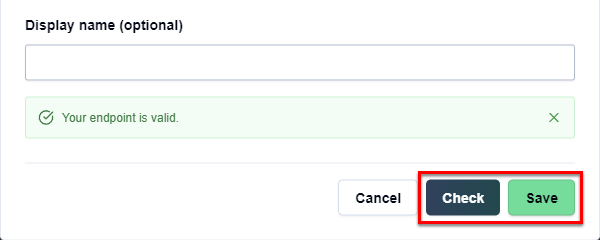
Click Check to validate the settings and click Save.
You have set up the Azure OpenAI API endpoint. All space users can now use the endpoint model in GPT for Excel and GPT for Word.
Connect to OpenAI-compatible API endpoints
This feature is only available if your space is on the Business or Enterprise plan or pay-as-you-go pricing.
GPT for Excel and GPT for Word can connect to any AI service that provides an OpenAI-compatible API endpoint. You can connect to two main types of services: cloud-based platforms, which provide access to models over the internet with no software installation or setup required on your part, and local servers, which you run on a local machine, such as your own computer or another computer on a local network.
You can use the endpoint-connected models both as Agent models (only in Excel) and bulk models, but the endpoint requirements are different:
-
Agent models: The endpoint must be compatible with the OpenAI Responses API and be publicly accessible over the internet through HTTPS. In addition, the model must support a context size of at least 32K tokens.
-
Bulk models: The endpoint must be compatible with the OpenAI Chat Completions API.
Here are some popular services that provide an OpenAI-compatible API endpoint:
-
Cloud-based platforms:
-
Local servers:
Depending on the model you use, the model settings defined in GPT for Excel or Word (temperature (creativity), top-p, frequency penalty, and presence penalty) may not work as expected. If you get bad results, try tweaking the settings.
- Agent models
- Bulk models
Prerequisites
You are the owner or an admin of the space.
You have an endpoint URL and, if needed, an API key for accessing the service.
The endpoint supports the following OpenAI-compatible API resource path:
/v1/responsesThe endpoint is publicly accessible over the internet through HTTPS.
The model supports a context size of at least 32K tokens.
-
Sign in to the GPT for Work dashboard with your Microsoft or Google account.
-
In the sidebar, select Custom API endpoints.
-
Select the Agent models tab.
-
Click OpenAI-compatible endpoints (Responses API).
tipIf you already have OpenAI-compatible API endpoints set up, click Add an OpenAI-compatible API endpoint.
-
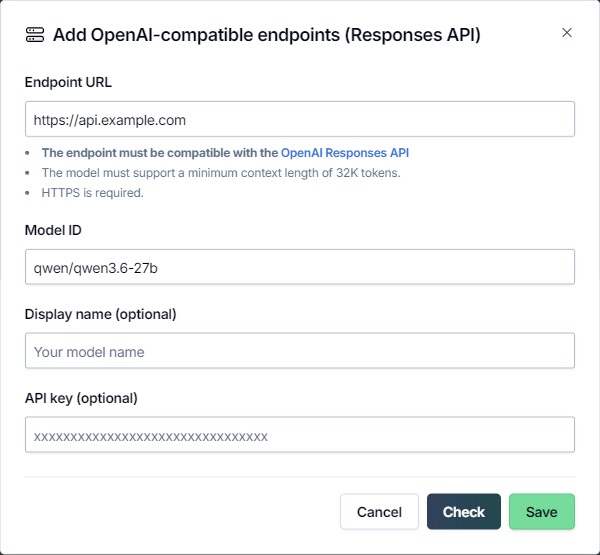
Define the endpoint settings:
-
Endpoint URL: Enter the URL of the service that provides the endpoint.
-
Model ID: Enter the ID of the model to use through the endpoint. The model ID is sent to the endpoint in the request payload.
-
Display name (optional): Enter a short name that identifies the model in the Agent model switcher.
-
API key (optional): If required, enter the API key for accessing the service.
-
-
Click Check to validate the settings and click Save.
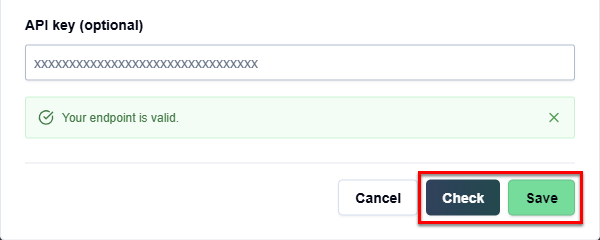
You have set up the OpenAI-compatible API endpoint. All space users can now select the model in the Agent model switcher in GPT for Excel.
Prerequisites
You are the owner or an admin of the space.
You have an endpoint URL and, if needed, an API key for accessing the service.
The endpoint supports the following OpenAI-compatible API resource paths:
/v1/models/v1/chat/completions
-
Sign in to the GPT for Work dashboard with your Microsoft or Google account.
-
In the sidebar, select Custom API endpoints.
-
Select the Bulk models tab.
-
Click OpenAI-compatible endpoints (Chat Completions API).
tipIf you already have OpenAI-compatible API endpoints set up, click Add an OpenAI-compatible API endpoint.
-
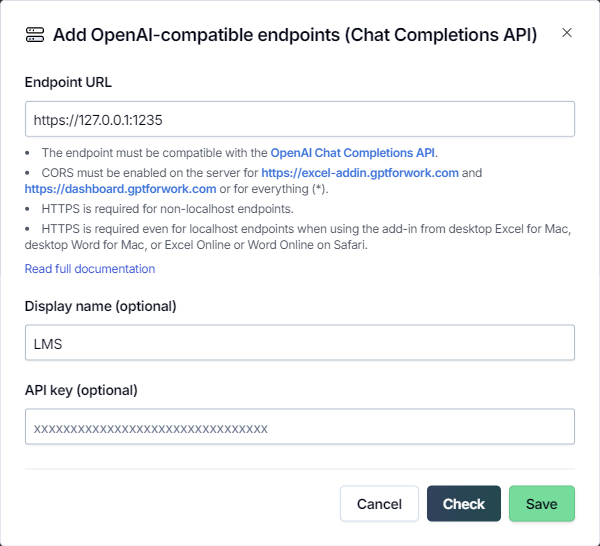
Define the endpoint settings:
-
Endpoint URL: Enter the URL of the service that provides the endpoint.
-
Display name (optional): Enter a short name that is prefixed to the model names in the model switcher. By default, the model names are prefixed with "custom/".
-
API key (optional): If required, enter the API key for accessing the service.
-
-
Click Check to validate the settings and click Save.
You have set up the OpenAI-compatible API endpoint. All space users can now use all models available through the endpoint in GPT for Excel and GPT for Word.