Connect to Ollama from Word
This feature is only available if your space is on the Business or Enterprise plan or pay-as-you-go pricing.
GPT for Word can connect to an Ollama server to use locally running open-source models. Ollama is an open-source platform that allows you to easily install, run, and serve models from a local machine, keeping your prompting entirely offline. You can use any model from the Ollama library.
Prerequisites
You have an Ollama server running with one or more models. For instructions on how to set up the server, see:
Depending on the model you use, the model settings defined in GPT for Word (temperature (creativity), top-p, frequency penalty, and presence penalty) may not work as expected. If you get bad results, try tweaking the settings.
To use models from an Ollama server:
Set up the API endpoint for an Ollama server
-
Sign in to the GPT for Work dashboard with your Microsoft or Google account.
-
In the sidebar, select Custom API endpoints.
-
Select the Bulk models tab.
-
Click OpenAI-compatible endpoints (Chat Completions API).
tipIf you already have OpenAI-compatible API endpoints set up, click Add an OpenAI-compatible API endpoint.
-
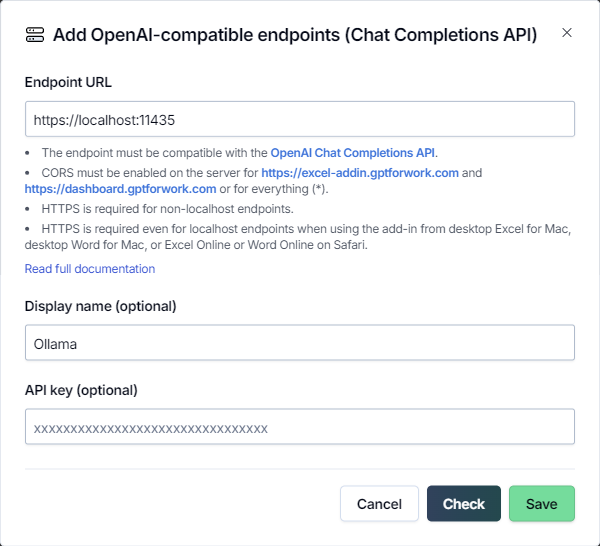
Define the endpoint settings:
-
Endpoint URL: Enter the URL of the Ollama server.
-
Display name (optional): Enter a short name that is prefixed to the model names in the model switcher. By default, the model names are prefixed with "custom/".
-
API key (optional): Leave this field empty. The Ollama server does not require an API key for access.
-
-
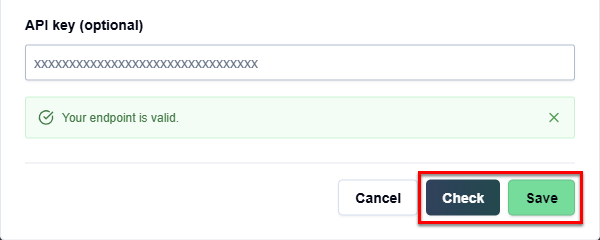
Click Check to validate the settings and click Save.
 tip
tipIf you get an error saying that the URL is invalid, make sure that the Ollama server supports:
You have set up the Ollama server API endpoint. You can now use all models available through the endpoint in GPT for Word.
Select a model from the Ollama server
-
Open a Microsoft Word document.
-
On the ribbon, select Home > GPT for Excel Word.
 info
infoIf GPT for Excel Word is not visible on the ribbon, or if it's grayed out, select Home > Add-ins > My Add-ins > GPT for Excel Word. Learn more.
-
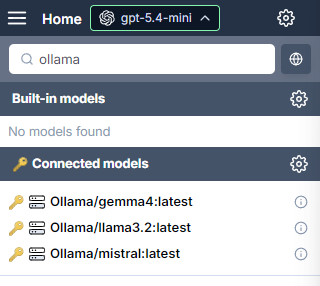
Open the model switcher and select a model. You can find the Ollama models under Connected models, at the end of the list.
 info
infoThe available models depend on the models available on the Ollama server.
GPT for Word now uses the selected model to generate responses.